
How to connect Zoho Books to FynHelp (read-only)
By FynHelp Editorial Team, Month-end close for CA firms
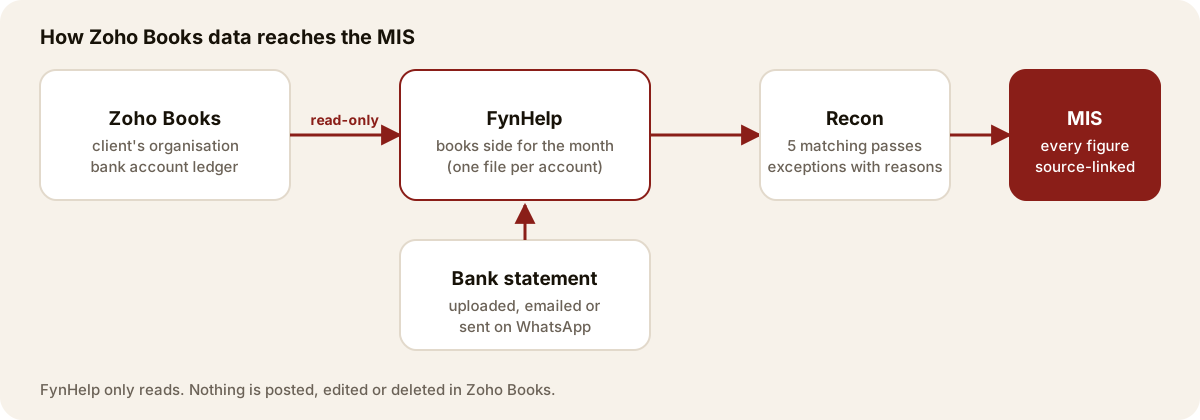
A partner connects the firm's Zoho login once, links each client to its Zoho bank account, and pulls a month's bank ledger in as the books side for reconciliation. FynHelp only reads.
Short answerIn FynHelp, open Settings → Integrations → Zoho Books and click Connect (partners only). Sign in to Zoho and allow read access. Back in FynHelp, link each client to its Zoho organisation and bank account, choose a month and click Pull month. The account's ledger arrives as that client's books side and Recon matches it against the bank statement. FynHelp never changes anything in Zoho.
If your clients keep their books in Zoho Books, you do not need to export anything. This guide covers what you need before you start, the four steps, and what FynHelp reads.
Before you start
- A partner does the setup. Connecting, linking and disconnecting are partner actions. Anyone on the team can pull a month once a client is linked.
- Your Zoho login must see the client's organisation. The client adds your login as a user of their Zoho Books organisation (in Zoho Books: Settings → Users & Roles → Invite User) with a role that can see banking. One login can see many clients' organisations.
- The client is already in FynHelp. Add the client on the Clients page first.
Step 1: Connect Zoho Books
Go to Settings → Integrations and find Zoho Books. Click Connect Zoho Books. Zoho asks you to sign in and shows what FynHelp is asking for: read access to settings (to list organisations), banking (bank accounts) and accountant data (the account ledger). Click Accept.

Step 2: Link a client to its Zoho bank account
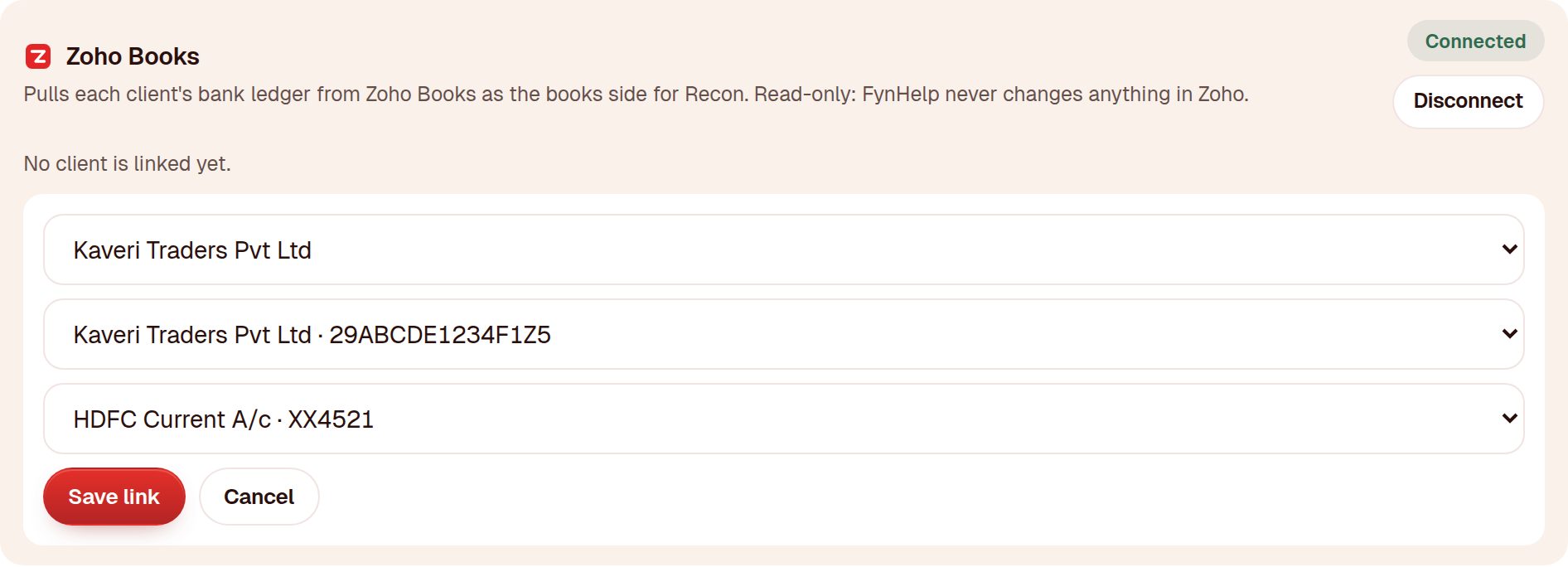
Back in FynHelp the card shows Connected. Click Link a client to a Zoho bank account, then choose the client, the Zoho organisation (with its GSTIN, so similar names are easy to tell apart) and the bank account. Click Save link. A client with two bank accounts gets two links.
Step 3: Pull a month
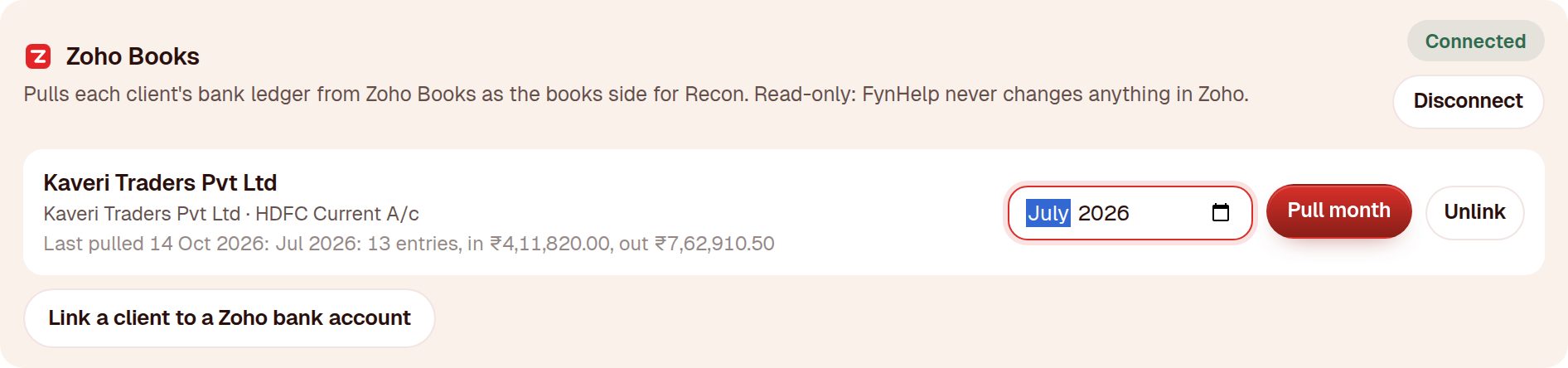
Pick the month on the client's row and click Pull month. FynHelp reads every entry posted to that bank account in the month and files it as one document, for example Zoho Books - HDFC Current A-c - Jul 2026.csv. The row shows how many entries came in and the money in and out, so you can check it against the account in Zoho.
Step 4: Reconcile as usual
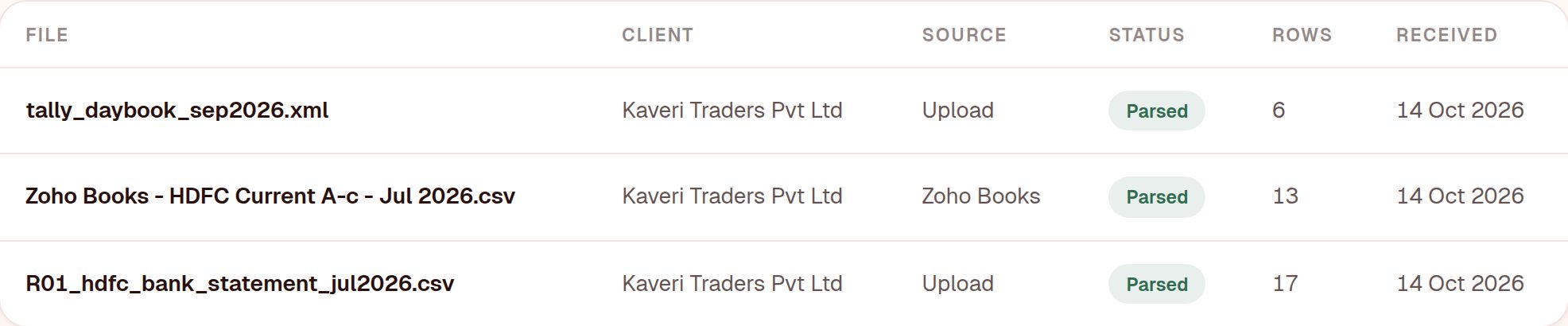
The pulled ledger appears on the Documents page with Zoho Books as its source. Upload, email or WhatsApp the client's bank statement for the same month as you do today, and Recon matches the two in its five passes. Unmatched lines go to the Exception queue with a reason.
Pulling again after changes in Zoho
If the client posts or edits entries after your pull, pull the same month again. FynHelp reads the new version in place of the old one; lines already matched stay matched, and if nothing changed in Zoho you are told so and nothing is redone.
What FynHelp reads, and what it never does
| Reads | Never does |
|---|---|
| The list of organisations your login can see | Create, edit or delete anything in Zoho |
| Each organisation's active bank accounts | Post vouchers, journals or bank entries |
| The ledger entries of the linked bank account, for the month you pull | Read invoices, contacts or other accounts you did not link |
Zoho's sign-in tokens are stored encrypted. To stop access, click Disconnect in FynHelp (documents already pulled stay), or remove FynHelp from Connected Apps in your Zoho account.
Frequently asked questions
Does FynHelp write anything back to Zoho Books?
No. The connection asks only for read access, and FynHelp has no feature that posts to Zoho. Corrections are made in Zoho by your team; the next pull picks them up.
Can one Zoho login cover all my clients?
Yes, if each client has added that login as a user of their Zoho Books organisation. Every organisation the login can see appears when you link a client.
Does the bank statement also come from Zoho?
No. Zoho gives the books side. The bank side is still the statement your client sends, so Recon compares two independent sources.
My firm's Zoho account is not in India. Does it work?
Yes. Zoho signs you in on your own region's server and FynHelp uses that region for every call.
Keep reading
How FynHelp helps
FynHelp runs a CA firm's month-end close in four steps: bank statement and Tally export extraction, bank reconciliation, source-traceable MIS reports and automated document follow-ups. See pricing for CA firms.
FynHelp reads statements and Tally exports, matches bank to books and drafts the MIS. Free to start, no card needed.
Start free trial